REVIEW · PALERMO
Palermo Audioguide – TravelMate app for your smartphone
Book on GetYourGuide →Operated by MyWoWo Srl · Bookable on GetYourGuide
If you hate collecting tickets, you’ll love this setup.
This Palermo audio guide turns your smartphone into your guidebook, with offline listening and no need to meet anyone. I also like that you can replay the audio chapters as many times as you want during the validity window, and even switch to the on-screen text when you want to read along. One possible drawback: the overall rating is only 3.4/5, and at least one written comment suggests the experience can feel short on detail, so you may want to use the app as a starting point rather than your only source.
What matters here is control. You decide when to start, how fast to go, and which sights to prioritize. You also get a tidy library: 31 audio pieces totaling 95 minutes, plus a quiz section to test what you picked up. Just remember, it’s self-guided, so you’ll get the best experience if you’re willing to stand still occasionally and listen with decent earphones.
In This Review
- Key Points That Make This Palermo App Worth Considering
- A Self-Guided Palermo Audio Guide, Minus the Paper Chase
- Price and Value: Is $9 a Smart Use of Your Day?
- How TravelMate Works: Download, Activation Code, Then Press Play
- Offline Audio and Text Mode: How to Avoid “Phone Battery Regrets”
- Your 95-Minute Palermo Route: 31 Audio Chapters in App Order
- Palermo Introduction
- The Wonders of Local Cuisine
- Archaeological Museum
- Capuchin Catacombs
- Cathedral
- Church of San Cataldo
- Church of San Giovanni degli Eremiti
- Church of the Gesù
- La Martorana Church
- Monreale Cathedral
- Oratory of the Rosary
- Palazzo Abatellis and Regional Gallery of Sicily
- Palazzo dei Normanni and Palatine Chapel
- Quattro Canti
- Teatro Massimo Opera House
- Villa Zisa
- Quiz Section and Learning Mode: A Small Way to Make It Stick
- Languages, Accessibility, and Who This App Suits Best
- Should You Book the Palermo Audioguide on TravelMate?
- FAQ
- Do I need a meeting point?
- How long is the audio guide valid?
- Can I use the audio guide offline?
- How much audio is included?
- What languages are available?
- Is it wheelchair accessible?
Key Points That Make This Palermo App Worth Considering

- No meeting point or paper tickets: download and start right away wherever you are
- 31 chapters in 95 minutes: enough structure for a good walk without turning it into a marathon
- Offline or online: you can listen without worrying as much about mobile coverage
- Replay for 1095 days: use it again on future Palermo trips (starting from first activation)
- You can read the audio text in the app: helpful when you want to multitask or confirm details
- Built-in learning quiz: short questions to keep you engaged while walking
A Self-Guided Palermo Audio Guide, Minus the Paper Chase

This is a smartphone audioguide you use in total autonomy. There’s no ticket desk, no “meet here at 10:30” pressure, and no shared device. In my view, that’s the big value: your day stays yours. You can begin your Palermo route from wherever you land, pause when you see something interesting, then continue when you feel like it.
The app is designed to feel like you have a guide beside you. The content aims to explain history, point out points of interest, and share curiosities for each stop. That matters because Palermo isn’t just one single style—it’s a mix of eras and influences—so a guided narration helps you connect what you’re seeing to a bigger story, even if you’re walking at your own pace.
At the same time, it’s still an app. You’ll be the one who decides when you’re close enough to a sight to listen. If you’re the type who wants a human guide to answer questions and adjust on the fly, this isn’t that. But if you’re the type who likes wandering and learning on your terms, it’s a solid fit.
You can also read our reviews of more tours and experiences in Palermo



Price and Value: Is $9 a Smart Use of Your Day?

At $9 per person, you’re paying for 95 minutes of professionally produced audio plus extra features (text display and a quiz). That’s not a “spend the day together” kind of service. It’s more like: pay a small amount to give your sightseeing a soundtrack and a bit of structure.
Here’s how I’d judge the value. If you’re already planning to visit several major Palermo landmarks anyway, the cost is low enough that it doesn’t feel like a big bet. You’re also not stuck with a one-time use. The app stays valid for 1095 days from your first activation, so you can reuse it later if you want to take another pass through the city. That alone can make a low-priced guide feel less like a one-off purchase.
Language support is another quiet value point. The audio is available in Italian, English, German, French, Spanish, Russian, and Chinese. If you’re traveling in a mixed-language group, this makes it easier to keep everyone engaged.
How TravelMate Works: Download, Activation Code, Then Press Play

There’s no meeting point to show up to. Instead, your work starts before you arrive: download the app and unlock it with your activation code.
To download:
- Android: search the Play Store for the app named TRAVELMATE
- iOS: search the App Store for TRAVELMATE TM
To find your activation code:
- In the confirmation email, use the option to show activity details or show your tickets.
- Look for the large barcode in the orange frame, tap it, and you’ll see a black-and-white barcode window.
- The code is a 10-digit number just under the barcode.
If you’re using the GetYourGuide app, you’ll find the same idea in the ticket area: show the activity in the app, tap the barcode, then read the 10-digit code underneath.
Once activated, you can listen online or offline. That’s important in Palermo because you may move between areas with spotty coverage. The offline option means your day depends less on signal strength.
Offline Audio and Text Mode: How to Avoid “Phone Battery Regrets”

You get two ways to experience the content:
- Audio (online or offline)
- Text: you can read the text of the audio files inside the app
That text option is underrated. When you’re standing in front of a church façade or reading a signboard, it’s easier to glance at the screen instead of rewinding the narration. It’s also helpful if there’s street noise where you are, or if you prefer a quick scan while you keep moving.
Earphones are recommended for better listening. I agree with that even if you’re using it in “quiet” sightseeing mode. A guide that depends on spoken narration works best when you’re not fighting wind, scooters, or the general Palermo soundscape.
Your 95-Minute Palermo Route: 31 Audio Chapters in App Order

The app includes 31 audio content pieces for a total of 95 minutes. That average time matters: you’re not committing to 3 hours straight. You can treat it like a menu. Pick a handful of chapters for a focused outing, or string them together for a longer walk.
Below is the route list exactly as the app presents it. For each stop, the content is meant to explain history, points of interest, and curiosities—so your best results come when you listen when you’re physically near the place.





Palermo Introduction
Start here if you want a mental map before you hit the main sights. This kind of opener usually sets expectations: what to pay attention to, how to connect neighborhoods and eras, and what to watch for as you walk. If you tend to wander without a plan, the intro helps you avoid feeling lost later. If you already know Palermo’s broad strokes, you can skip ahead and use the intro only as a quick refresher.
The Wonders of Local Cuisine
This chapter is your prompt to look at Palermo like a place people live and eat, not just a collection of monuments. Even if you don’t plan to do a formal food tour, this audio track can help you order with more confidence and notice food culture as part of daily life. I suggest listening to this early in your trip, then using it while you’re out and hungry.
Archaeological Museum
This one is for when you want a break from streets and start thinking in deeper time. The audio content is designed to guide you through what matters in a museum setting: historical context and notable curiosities tied to what you’re seeing. Practically, museums reward short, focused listening. Put on your earphones, pause between rooms, and let the audio give you a thread to follow.
Capuchin Catacombs
This chapter is the one you’ll want ready in advance because catacomb-style visits often involve controlled entry and a very specific atmosphere. Even without assuming details, the audio’s job is clear: give you context and curiosities so you understand what you’re looking at instead of just walking through silent spaces. I recommend listening in short segments and taking breaks when you need your bearings.
Cathedral
The Cathedral chapter is your chance to get oriented around a major landmark. Since the app aims to explain history and points of interest, this track works best when you can stop, look around, and let the narration match what’s in front of you. If crowds are heavy, use the text mode to keep your place while you wait for an open moment to listen fully.
Church of San Cataldo
Small churches can be easy to rush past, especially when you’re hopping from one sight to the next. This chapter is there to slow you down just a bit by framing why the place is worth your attention. Put it on as you approach, then listen while you’re stopped. You’ll get more out of it if you let the audio guide your eye, rather than reading random details off signs.
Church of San Giovanni degli Eremiti
This stop fits well for people who like learning the names and stories behind what they’re seeing. The audio is built to cover history and curiosities, so it’s a good match for travelers who want context without hiring a guide for every location. Try not to play the audio at walking speed. Walk in, stop, listen, then continue.
Church of the Gesù
If your Palermo day is packed, this is one you’ll appreciate for keeping you from skipping the story. The audio track is designed to help you connect the visible building to its broader background. A practical tip: when you’re listening in places of worship, keep your phone volume reasonable and pause the audio when needed for respect and quiet.
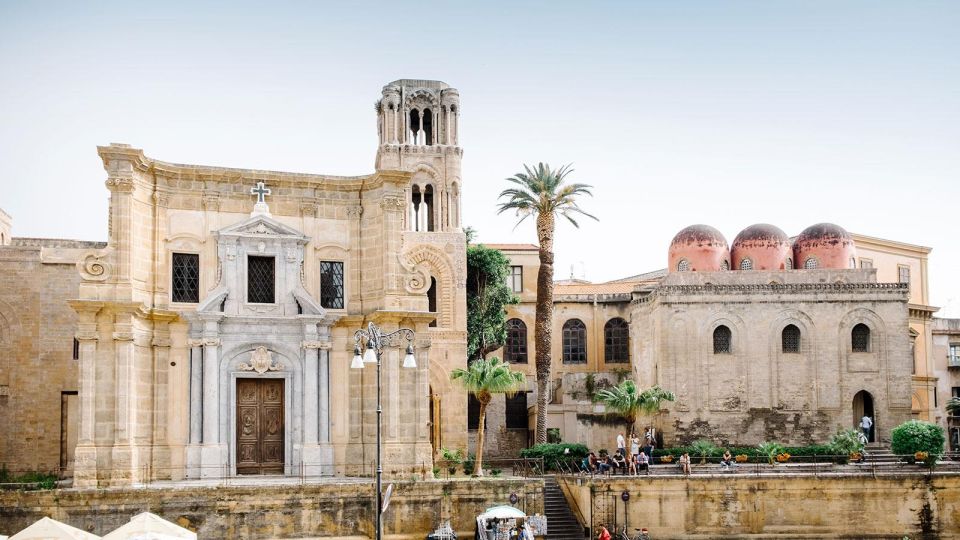
La Martorana Church
This is a strong “listen and compare” chapter. You’re moving through multiple religious buildings, so using the audio to notice how each place is framed can make the route feel less repetitive. I like using the text option here too, because it’s easier to compare what the app highlights between one church and the next when you have words on screen.
Monreale Cathedral
One chapter takes you beyond central Palermo in concept (Monreale is its own destination). If you include this stop, plan your day around getting there and back. The audio content still follows the same style—history, points of interest, and curiosities—so it can function as your “ticket” to understanding what you’re seeing once you arrive.
Oratory of the Rosary
This is the kind of location where a short, guided narrative can really help. The app’s approach is consistent, so you’ll get a structured explanation rather than just sound effects. I’d treat it like a short study session: listen first, then look more carefully at what the narration pointed you toward.
Palazzo Abatellis and Regional Gallery of Sicily
This chapter combines a palace setting with museum-style viewing. That mix usually means your route benefits from pacing. Put the audio on when you enter and then pause it when you need time to look at objects. Because the guide includes points of interest and curiosities, it’s especially useful when you don’t know what you should prioritize inside.
Palazzo dei Normanni and Palatine Chapel
Another “big setting” chapter. With places like this, the goal is to avoid feeling like you’re just touring rooms without a story. The audio is meant to provide context and highlight what matters so the building becomes more than a backdrop for photos. If you like to photograph, use the audio as your anchor, then capture images after the key narration sections.
Quattro Canti
Urban squares can be tricky for audio guides because you’re surrounded by movement. This chapter is useful for helping you understand the space rather than just passing through it. Listen when you stand at a vantage point, then take a moment to look around before you move on. The text option is handy here if you’re dealing with traffic noise.
Teatro Massimo Opera House
This stop works well if you like architecture and cultural institutions. The audio track is designed to add meaning—history, points of interest, and curiosities—so you’re not just admiring the exterior in passing. If you’re not entering (depending on your own plans), you can still use the audio as a way to learn what this place represents.
Villa Zisa
For a quieter end to your route, this chapter can help you step away from the densest sights. The app’s consistent format means you’ll still get context and curiosities, even if the vibe of the location is different from a cathedral or palace. If you’re tired, skim with the text mode and save your full listening for when you’re standing still.
Quiz Section and Learning Mode: A Small Way to Make It Stick
Besides the audio chapters, the app includes a quiz section with short questions about the city. It’s not a replacement for deep guidebooks, but it’s a smart way to check if the key ideas stuck in your head. I like doing the quiz at the end of a sightseeing block, while the sights are still fresh.
If you enjoy learning through repetition, replaying chapters also helps. You can revisit specific stops without starting over from the beginning.
Languages, Accessibility, and Who This App Suits Best

The audio guide is available in multiple languages: Italian, English, German, French, Spanish, Russian, and Chinese. That’s great for international trips because you can keep your sightseeing rhythm without switching to a shared language.
Wheelchair accessibility is listed as available. For your planning, treat the app as a narration tool; how you physically get in and around specific sites still depends on the site layout and any on-site rules.
Who I think this suits best:
- People who like self-paced city exploring
- Travelers who don’t want paper tickets or a meet-up time
- Anyone who wants a low-cost way to add context to major Palermo landmarks
- Visitors who are comfortable using their own smartphone and earphones
Who should be cautious:
- If you expect a human guide level of detail and interaction, you might find it frustrating.
- If you want a deep, long-form lecture at every stop, the total 95-minute audio might feel short.
Should You Book the Palermo Audioguide on TravelMate?

I’d book it if you want a smart, budget-friendly way to understand Palermo while staying flexible. For $9, you’re getting 31 chapters, offline playback, and the ability to replay content during a 1095-day validity period. That’s strong value if you plan to visit several sights and you’re okay doing some listening on your own.
Skip it or pair it with other resources if you’re the type who needs lots of on-the-spot detail. The app can set your direction, but it can’t answer personal questions like a live guide. Still, for an easy, low-commitment way to turn landmarks into a story, this is exactly the kind of thing I’d keep on my phone for a future Palermo return.
FAQ

Do I need a meeting point?
No. There is no meeting point for this activity. Download the app and start your experience wherever you prefer.
How long is the audio guide valid?
It is valid for 1095 days from your first activation.
Can I use the audio guide offline?
Yes. You can listen online or offline.
How much audio is included?
The audioguide includes 31 audio content pieces for a total of 95 minutes.
What languages are available?
The audio guide is available in Italian, English, German, French, Spanish, Russian, and Chinese.
Is it wheelchair accessible?
Yes, wheelchair accessibility is listed for this activity.